# Authentication
Source: /authentication
Obtain an access token, authenticate your requests, and reuse tokens safely.
## Before you start [#before-you-start]
Ask [our dev team](mailto:max@thepalia.de) for a **client ID** and **client secret**. Use `https://api.staging.thepalia.de` for development and testing, and `https://api.thepalia.de` for production. Use the supplied credentials with the selected API server. Offer IDs and enrollment IDs must exist in that environment.
> Keep credentials on your server
>
> Call the API from your backend. Never expose your client secret or access token in frontend code, public
> repositories, or URLs. The documentation playground is for testing with your own credentials.
## 1. Obtain a token [#1-obtain-a-token]
The token endpoint implements the [OAuth 2.0 client credentials grant](https://datatracker.ietf.org/doc/html/rfc6749#section-4.4), so standard OAuth client libraries work out of the box. Send **`POST /v1/oauth/token`** with your credentials in one of these formats:
**JSON body** (`Content-Type: application/json`):
```json request="POST /v1/oauth/token"
{
"client_id": "YOUR_CLIENT_ID",
"client_secret": "YOUR_CLIENT_SECRET"
}
```
**Form data** (`Content-Type: application/x-www-form-urlencoded` as defined by OAuth 2.0; `multipart/form-data` is accepted too):
```http
POST /v1/oauth/token
Content-Type: application/x-www-form-urlencoded
grant_type=client_credentials&client_id=YOUR_CLIENT_ID&client_secret=YOUR_CLIENT_SECRET
```
**HTTP Basic authentication** (no body needed):
```http
POST /v1/oauth/token
Authorization: Basic BASE64(YOUR_CLIENT_ID:YOUR_CLIENT_SECRET)
```
`grant_type` is optional; `client_credentials` is the only supported grant.
> Authorization header takes precedence
>
> If the token request contains any `Authorization` header, it is parsed as HTTP Basic credentials and the body
> is ignored. A leftover header such as `Authorization: Bearer ...` makes the request fail with `400`, even when
> the body contains valid credentials. Send no `Authorization` header when you use a JSON or form body.
A successful response contains a reusable token:
```json response="POST /v1/oauth/token"
{
"access_token": "YOUR_ACCESS_TOKEN",
"token_type": "Bearer"
}
```
See the [token reference](/reference/oauth/get_token_for_credentials) for the full schema and error responses. Use one credential method consistently.
## 2. Authenticate requests [#2-authenticate-requests]
Add this header to protected operations:
```http
Authorization: Bearer YOUR_ACCESS_TOKEN
```
For example, use the token with [Create a course enrollment](/reference/courseenrollments/create_course_enrollment_external). In the playground, paste `Bearer YOUR_ACCESS_TOKEN` into **Authorization** using your staging token. The playground sends requests only to staging.
Your successful outcome is an authenticated API response rather than `401`. The [enrollment guide](/guides/create-enrollment) shows the complete request and expected response.
## 3. Reuse the token [#3-reuse-the-token]
Tokens last **24 hours**. The response does not include an `expires_in` field; record the issuance time on your server and refresh shortly before the 24-hour lifetime ends. Share that cache across workers where practical so simultaneous requests do not each issue a token.
> One token, many requests
>
> Do not request a token for every API call. Token issuance is limited to **20 requests per minute per client
> IP**. See [Rate limits & retries](/rate-limits).
## Troubleshoot authentication [#troubleshoot-authentication]
| Response | What to check |
| ----------------------------- | ----------------------------------------------------------------------------------------------------------------- |
| `400` from the token endpoint | Check the credential fields, and remove any non-Basic `Authorization` header when sending credentials in a body. |
| `401` | Verify credentials, token expiry, the `Bearer` prefix, and the selected environment. |
| `415` from the token endpoint | Use JSON, `application/x-www-form-urlencoded`, `multipart/form-data`, or HTTP Basic. |
| `429` from the token endpoint | Reuse an existing token and wait before requesting another. |
Use the reference for each operation's documented errors. An expired token can be replaced; retrying a failed enrollment creation needs additional care because creation is not idempotent.
# Create a course enrollment
Source: /guides/create-enrollment
Connect your checkout to thepalia and send participants their registration link.
## Before you start [#before-you-start]
You need a server that can make API requests, an existing checkout, and the course's suitability confirmation before purchase. Contact [our dev team](mailto:max@thepalia.de) for the suitability text, `client_id`, `client_secret`, and the `offerId` for your chosen environment.
Start with `https://api.staging.thepalia.de`. Staging is for testing and does not generate completion certificates. Production uses `https://api.thepalia.de`; enrollments there are billed. Use the supplied credentials and the offer ID for your selected environment.
```mermaid
sequenceDiagram
autonumber
participant C as Customer
participant P as Partner checkout
participant PS as Partner server
participant T as thepalia
C->>P: Confirm suitability and purchase course
P->>PS: Purchase successful
PS->>T: OAuth with client_id and client_secret
T->>PS: access_token
PS->>T: Create enrollment with firstName, lastName, eMail, offerId
T->>PS: registrationUrl, userId, courseEnrollmentId
PS->>C: Email registrationUrl
C->>T: Open link and complete registration
Note over C,T: thepalia handles registration, course delivery, and course support
```
## 1. Obtain an access token [#1-obtain-an-access-token]
Call **`POST /v1/oauth/token`** from your server. See [Obtain an API access token](/reference/oauth/get_token_for_credentials) for JSON, form, and HTTP Basic options.
```json request="POST /v1/oauth/token"
{
"client_id": "YOUR_CLIENT_ID",
"client_secret": "YOUR_CLIENT_SECRET"
}
```
A successful HTTP 200 response contains:
```json response="POST /v1/oauth/token"
{
"access_token": "EXAMPLE_ACCESS_TOKEN",
"token_type": "Bearer"
}
```
Reuse the token for up to **24 hours**; you do not need a new token before every request. Issuance is limited to **20 requests per minute per client IP**. Obtain a new token when it expires. If a replacement token is rejected too, check credentials instead of repeatedly requesting tokens.
Keep credentials on your server. Do not put them in customer-facing JavaScript, URLs, source control, or logs.
## 2. Create the enrollment after purchase [#2-create-the-enrollment-after-purchase]
Call **`POST /v1/course-enrollments`** only after the purchase succeeded and the participant confirmed the suitability requirements. See [Create a course enrollment](/reference/courseenrollments/create_course_enrollment_external) for the full contract and playground.
Send this header:
```http
Authorization: Bearer EXAMPLE_ACCESS_TOKEN
Content-Type: application/json
```
Send this body, replacing the example offer ID with the one supplied by thepalia:
```json request="POST /v1/course-enrollments"
{
"offerId": "11111111-1111-4111-8111-111111111111",
"firstName": "Alex",
"lastName": "Example",
"eMail": "alex@example.com"
}
```
Existing users are matched by email; their enrollment is added to the existing user. A successful HTTP 200 response contains:
```json response="POST /v1/course-enrollments"
{
"userId": "22222222-2222-4222-8222-222222222222",
"courseEnrollmentId": "33333333-3333-4333-8333-333333333333",
"registrationUrl": "https://staging.thepalia.app/enrollment/registration?enrollmentId=33333333-3333-4333-8333-333333333333"
}
```
## 3. Store the IDs and send the registration link [#3-store-the-ids-and-send-the-registration-link]
Store `userId` and `courseEnrollmentId` with the customer and order in your system. Use the enrollment ID for course access, progress, cancellation, and support requests.
Email `registrationUrl` to the participant. The registration window lasts **31 days**. Tell the participant to complete registration within that period; contact thepalia if the window has expired.
After registration, thepalia provides course delivery and course-related support. For a button that opens an existing course, follow the [magic-link guide](/guides/magic-link).
## 4. Handle unsuccessful requests [#4-handle-unsuccessful-requests]
Check the response before deciding whether another request is safe:
- **400 or 422:** correct the request; resending the same invalid input will not help.
- **401:** check or renew an expired token, then retry with valid authentication.
- **403:** check that the offer belongs to your partner account in the selected environment.
- **404:** check the offer or enrollment ID and selected environment.
- **429 on token issuance:** wait before trying again; reuse a valid token when available.
- **Timeout, lost connection, or an unexpected server error during creation:** the enrollment may already exist. Reconcile with thepalia before submitting another creation request.
Enrollment creation has **no idempotency protection**. Repeating the same request creates another enrollment and can result in additional billing. For read requests, use limited retries with a delay rather than an immediate retry loop.
## Read progress [#read-progress]
Call **`GET /v1/course-enrollments/{enrollment_id}/progress`** with your Bearer token. Replace `{enrollment_id}` with the stored `courseEnrollmentId`.
The [progress reference](/reference/courseenrollments/get_course_enrollment_progress_by_enrollment_id) describes completed sections and units, durations, the access period, and completion dates. Dates can be `null` while no completion has occurred.
## Cancel an enrollment [#cancel-an-enrollment]
Call **`DELETE /v1/course-enrollments/{enrollment_id}`** with your Bearer token. The [cancellation reference](/reference/courseenrollments/delete_course_enrollment_external_by_enrollment_id) describes the request and errors.
Success returns **HTTP 204 with no response body**. Deletion removes course access; a missing or already deleted enrollment returns 404. Payment refunds are a separate action in your checkout system.
## Activation codes: only when instructed [#activation-codes-only-when-instructed]
**Legacy integration:** use **`POST /v1/activation-codes`** only if thepalia explicitly tells you to. Otherwise, use course enrollment creation. See the [activation-code reference](/reference/activationcodes/generate_activation_code) for the agreed alternative flow.
## Check your integration [#check-your-integration]
Using staging, complete a test purchase and verify that you receive HTTP 200, store both IDs, send the returned registration link, and can complete registration and access the course. Confirm that the email address and course match your test purchase before preparing production credentials and offer IDs.
# Open a course with a magic link
Source: /guides/magic-link
Add a course-access button to your app or customer account area.
## Before you start [#before-you-start]
You need an existing enrollment, its stored `courseEnrollmentId`, and your API credentials. First follow [Create a course enrollment](/guides/create-enrollment). Contact [our dev team](mailto:max@thepalia.de) if you need integration details.
The endpoint accepts enrollments belonging to your partner account and active customer users. Protect your own course button so a customer can only request a link for their own enrollment.
```mermaid
sequenceDiagram
autonumber
participant C as Customer
participant PS as Partner server
participant T as thepalia
C->>PS: Click course-access button
opt No valid API token cached
PS->>T: OAuth with client_id and client_secret
T->>PS: access_token, valid for 24 hours
end
PS->>T: Request magic link with Bearer token and courseEnrollmentId
T->>PS: magicLink, valid for 30 minutes
PS->>C: Redirect to magicLink
C->>T: Open course
```
## 1. Reuse or obtain an API token [#1-reuse-or-obtain-an-api-token]
Reuse an unexpired API token. If you need a new one, call **`POST /v1/oauth/token`** using the [authentication reference](/reference/oauth/get_token_for_credentials):
```json request="POST /v1/oauth/token"
{
"client_id": "YOUR_CLIENT_ID",
"client_secret": "YOUR_CLIENT_SECRET"
}
```
Tokens last **24 hours**. Issuance is limited to **20 requests per minute per client IP**. Keep credentials and token handling on your server.
Use `https://api.staging.thepalia.de` for testing; staging does not generate completion certificates. Use `https://api.thepalia.de` for production with matching credentials and enrollment IDs. Production enrollments are billed.
## 2. Generate the link when the customer clicks [#2-generate-the-link-when-the-customer-clicks]
Call **`GET /v1/course-enrollments/{enrollment_id}/magic-link`**, replacing `{enrollment_id}` with the stored `courseEnrollmentId`.
```http
Authorization: Bearer EXAMPLE_ACCESS_TOKEN
```
The [magic-link reference](/reference/courseenrollments/get_course_enrollment_magic_link_by_enrollment_id) includes the full request, errors, and playground. A successful HTTP 200 response contains:
```json response="GET /v1/course-enrollments/{enrollment_id}/magic-link"
{
"magicLink": "https://staging.thepalia.app/user/magic-link/EXAMPLE_TOKEN?ref=%2Fcourses%2F33333333-3333-4333-8333-333333333333"
}
```
## 3. Redirect immediately [#3-redirect-immediately]
Redirect the participant to the returned `magicLink`. It authenticates them and sends them to the course.
The link expires after **30 minutes**, so generate it immediately before redirecting. Do not pre-generate links for a campaign or store them as permanent course URLs. Do not publish or log them.
If authentication fails, check or renew the API token. For other errors, use the [error-handling guidance](/guides/create-enrollment#4-handle-unsuccessful-requests). Read requests can use limited retries with a delay.
## Check your integration [#check-your-integration]
Using a staging enrollment, click your course button and verify that your server requests a fresh magic link, redirects to it, and opens the correct participant's course. The button should generate a new link each time it is used.
# Stripe-Zahlungslink einrichten (Deutsch)
Source: /guides/stripe-payment-link-de
Verkaufe deinen Kurs ohne eigene Shop-Anbindung und versende den Kurszugang automatisch.
[English guide](/guides/stripe-payment-link) · [Deutsche Anleitung](/guides/stripe-payment-link-de)
## Bevor du beginnst [#bevor-du-beginnst]
Du brauchst ein Stripe-Konto, dein Kursprodukt mit Preis, die **offer_id**, die konkrete **THEPALIA-Webhook-URL** und den abgestimmten Text zu den Kontraindikationen. Du erhältst diese Angaben von [unserem Entwicklerteam](mailto:max@thepalia.de).
Kläre mit deinem technischen Kontakt, welche Stripe-Testumgebung mit welcher THEPALIA-Umgebung verbunden wird und wie du das Signaturgeheimnis sicher übergibst. Beginne in dieser Testumgebung. Richte keine echte Zahlung als improvisierten Funktionstest ein.
> Zu den Bildern und GIFs
>
> Die Originalaufnahmen zeigen das deutsche Stripe-Dashboard. Menüs können in deinem Konto abweichen. Folge den
> schriftlichen Schritten und verwende deine eigenen Werte für die jeweilige Umgebung, nicht die Beispieldaten
> aus den Aufnahmen. Öffne eine Demo, wenn du sie ansehen möchtest.
## 1. Stripe-Konto und Produkt vorbereiten [#1-stripe-konto-und-produkt-vorbereiten]
1. Registriere dich im [Stripe-Dashboard](https://dashboard.stripe.com/register?locale=de-DE), falls du noch kein Konto hast, und bestätige deine E-Mail-Adresse.
2. Öffne den Produktbereich im [Dashboard](https://dashboard.stripe.com/).
3. Lege dein Kursprodukt mit dem vereinbarten einmaligen Preis an. Ergänze Name, Beschreibung und bei Bedarf ein Bild.
4. Speichere das Produkt in der vereinbarten Testumgebung.
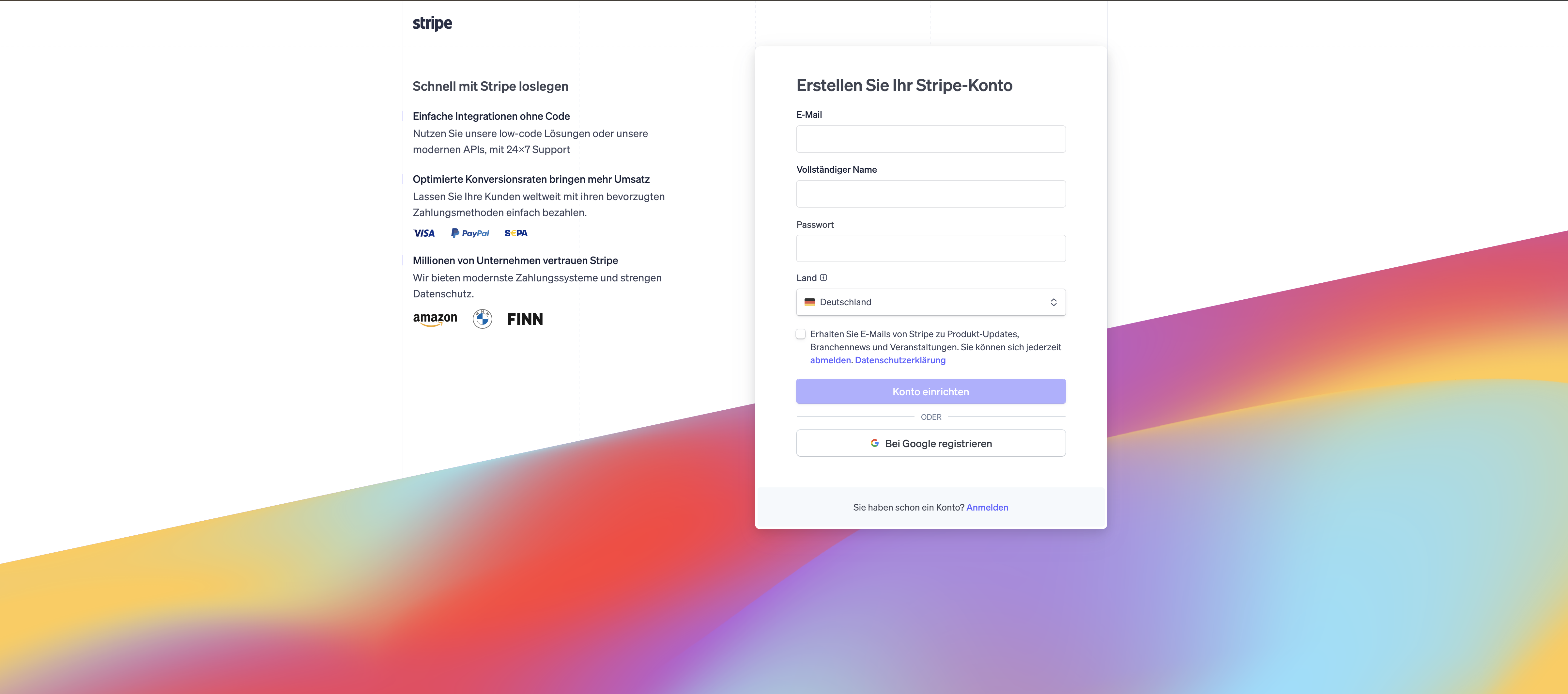
Erstelle dein Stripe-Konto, bevor du das Kursprodukt einrichtest.
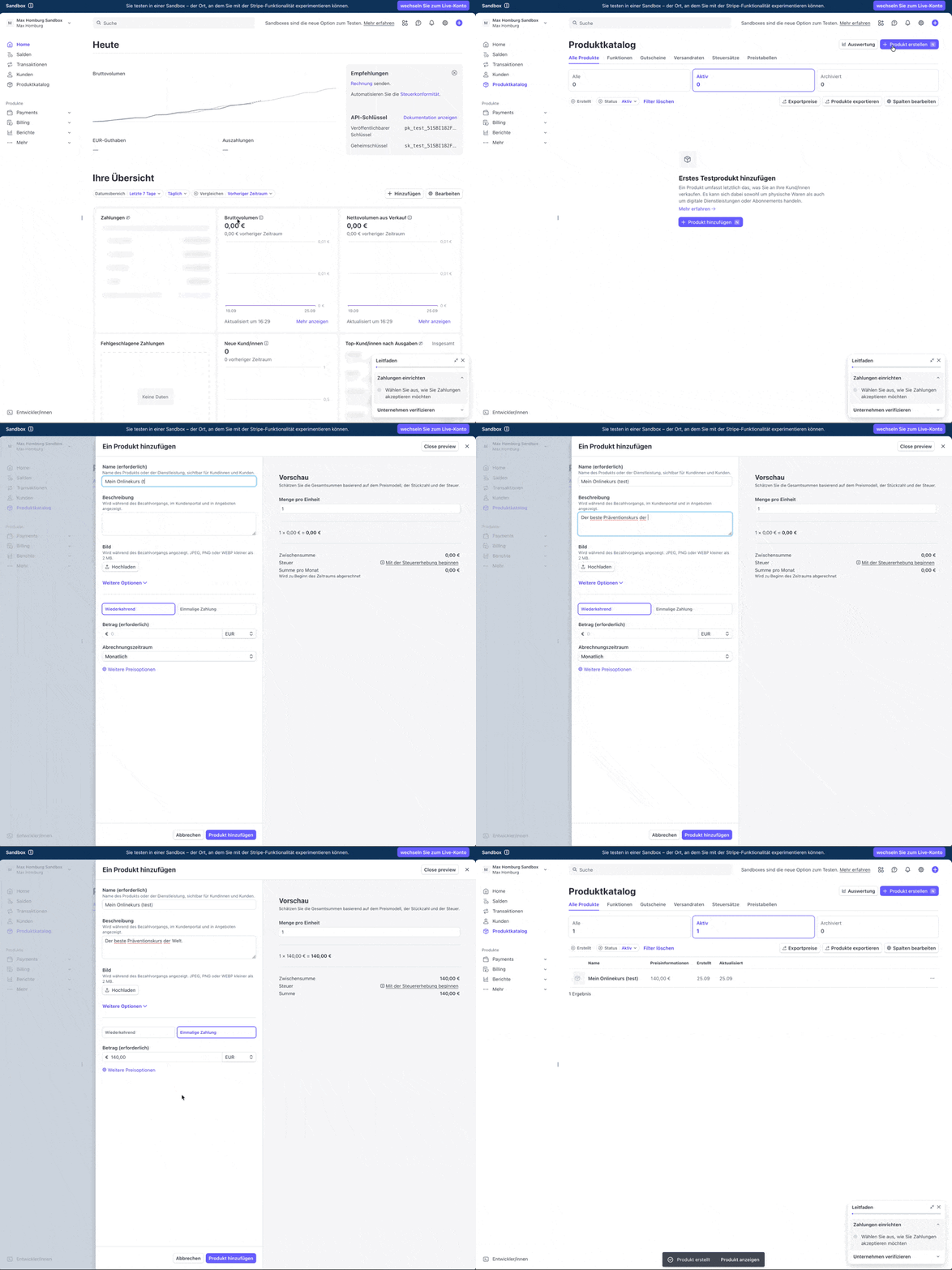
Die Aufnahme zeigt ein Beispielprodukt. Verwende deinen vereinbarten Kursnamen und Preis.
## 2. Zahlungslink erstellen [#2-zahlungslink-erstellen]
1. Öffne **Payment Links** und erstelle einen neuen Zahlungslink für das Kursprodukt.
2. Prüfe Produkt, Betrag und Währung.
3. Lege zwei neue Textfelder mit den Labels **Vorname** und **Nachname** an. Die Namen müssen exakt stimmen. Benenne vorhandene Felder nicht nur um.
4. Stelle sicher, dass die E-Mail-Adresse der kaufenden Person erfasst wird. Dorthin wird die Registrierungsmail gesendet.
5. Speichere den Link.
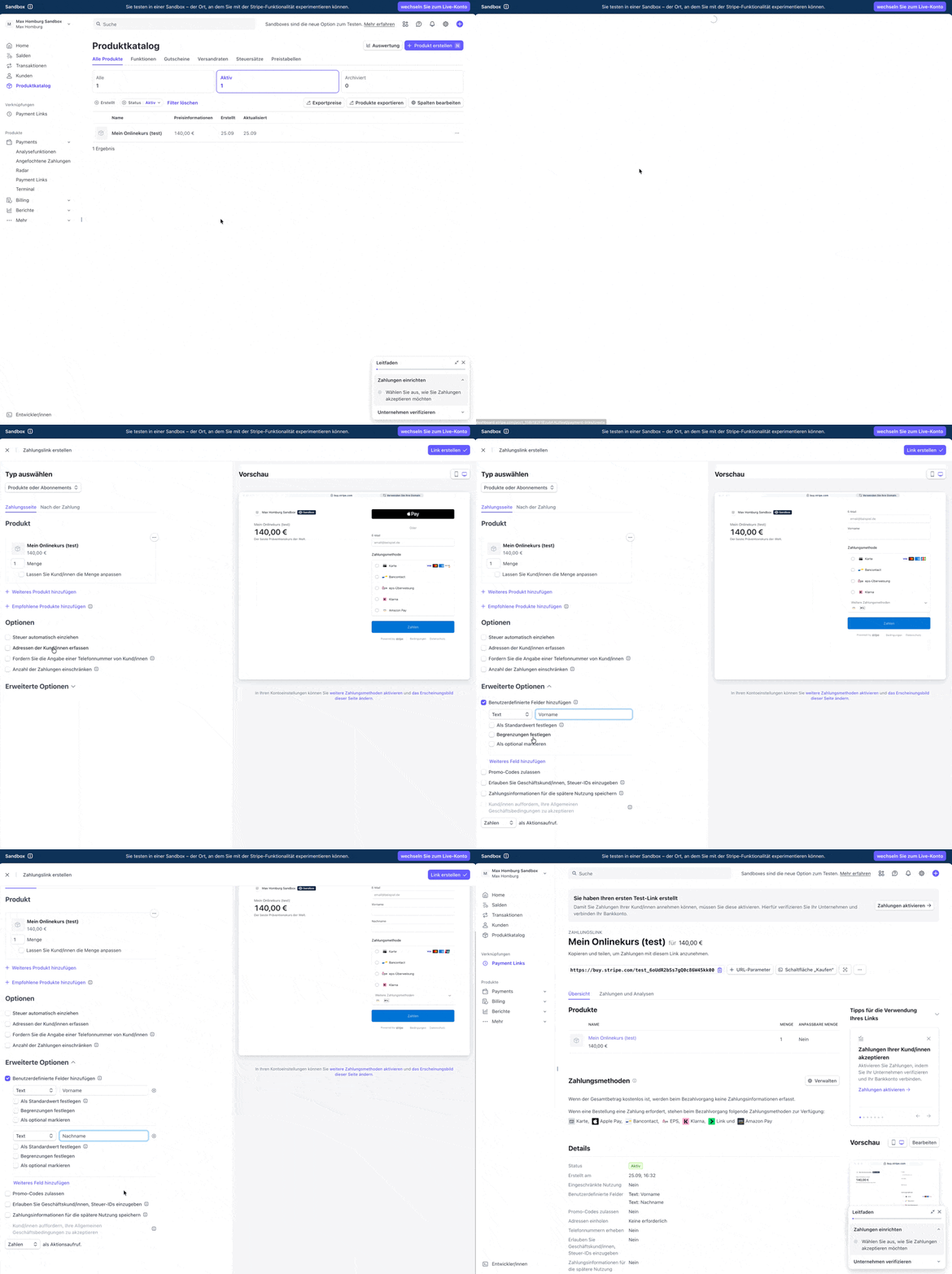
Lege beide Namensfelder neu an und benenne sie exakt wie beschrieben.
## 3. Angebot zuordnen [#3-angebot-zuordnen]
Füge am Payment Link das Metadatum **offer_id** hinzu. Verwende als Wert die ID, die THEPALIA für genau diesen Kurs und diese Umgebung bereitgestellt hat. Beispiel: `YOUR_OFFER_ID` ist ein Platzhalter und muss ersetzt werden.
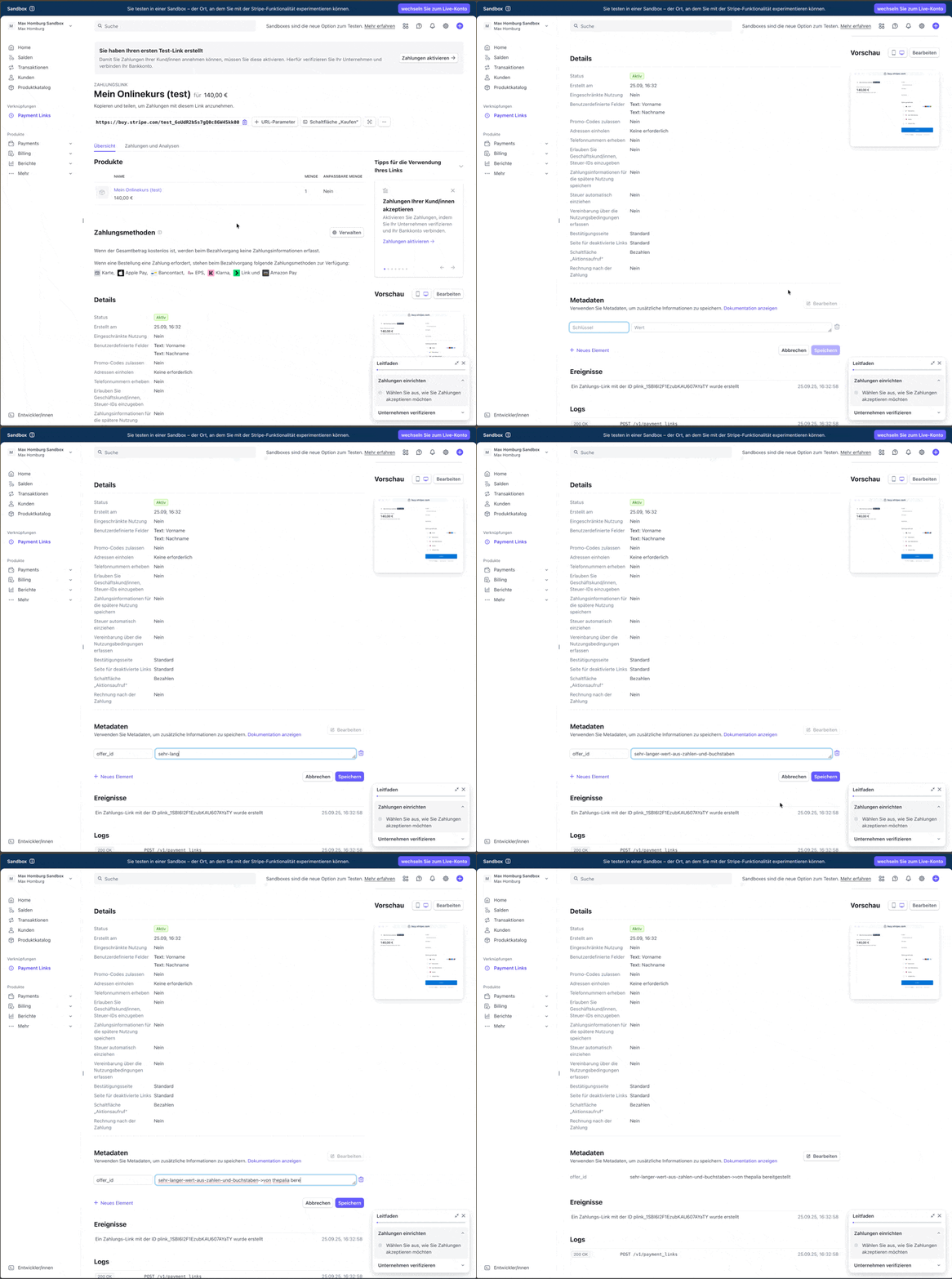
Nutze die von thepalia bereitgestellte Offer-ID für deinen Kurs und deine Umgebung, nicht den Beispieltext.
## 4. Webhook verbinden [#4-webhook-verbinden]
Ein Webhook übermittelt das Checkout-Ereignis von Stripe an THEPALIA. Nach erfolgreicher Verarbeitung kann THEPALIA die Registrierungsmail an die kaufende Person senden.
1. Öffne in Stripe den Bereich für Webhooks bzw. Ereignisziele. Die Menüanordnung kann abweichen.
2. Füge die von THEPALIA bereitgestellte Webhook-URL hinzu. Verwende keine selbst abgeleitete URL.
3. Wähle für diesen Weg ausschließlich **checkout.session.completed**.
4. Speichere den Endpunkt und kopiere das zu dieser Umgebung gehörende Signaturgeheimnis.
5. Übergebe es über den vereinbarten sicheren Kanal an THEPALIA. Warte auf die Bestätigung, dass die Verbindung eingerichtet ist.
Zusätzliche Zahlungsarten mit späterer Zahlungsbestätigung aktivierst du erst nach technischer Abstimmung. Ein abgeschlossener Checkout bedeutet bei solchen Zahlungsarten nicht automatisch eine endgültig erfolgreiche Zahlung.
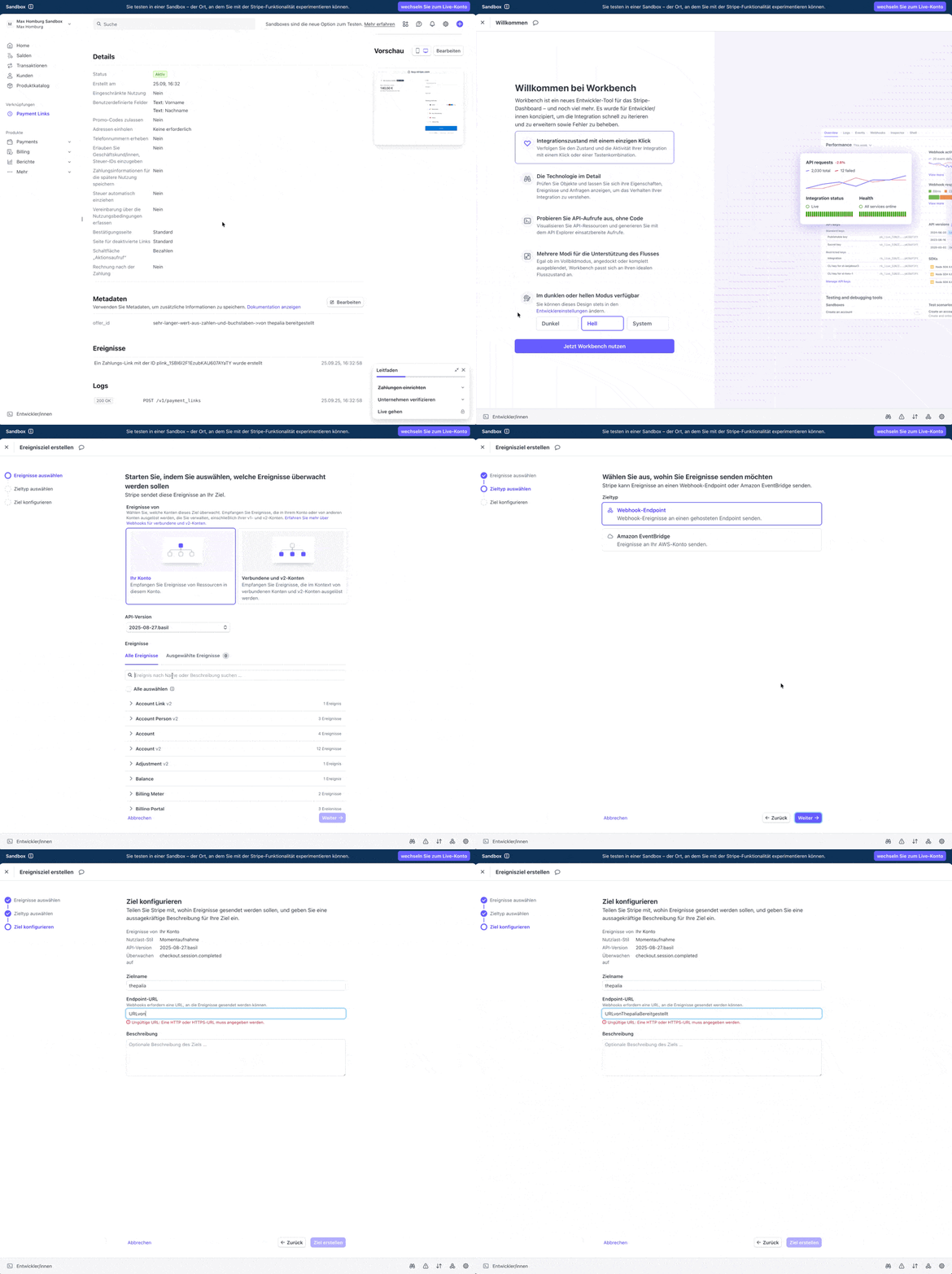
Die Aufnahme zeigt die Einrichtung des Ereignisziels. Trage die gültige Webhook-URL von thepalia ein und speichere sie; die Beispieleingabe ist kein funktionierender Endpunkt.
## 5. Kauf und Kurszugang testen [#5-kauf-und-kurszugang-testen]
Nutze [Stripes offizielle Testanleitung](https://docs.stripe.com/testing) und den mit THEPALIA vereinbarten Testfall.
1. Öffne den Test-Zahlungslink und prüfe Kurs und Preis.
2. Gib Testname und Test-E-Mail-Adresse ein und führe den vereinbarten Testkauf durch.
3. Prüfe in Stripe das verarbeitete Ereignis und die Zuordnung zur richtigen offer_id.
4. Prüfe, ob die Registrierungsmail eintrifft und der Registrierungslink zum richtigen Kurs führt.
5. Schließe die Registrierung ab und prüfe den tatsächlichen Kurszugriff.
Ein manuell abgesendetes Webhook-Ereignis ersetzt diesen vollständigen Test nicht. Die THEPALIA-Staging-Umgebung ist für Tests; sie erstellt keine Teilnahmebescheinigungen.
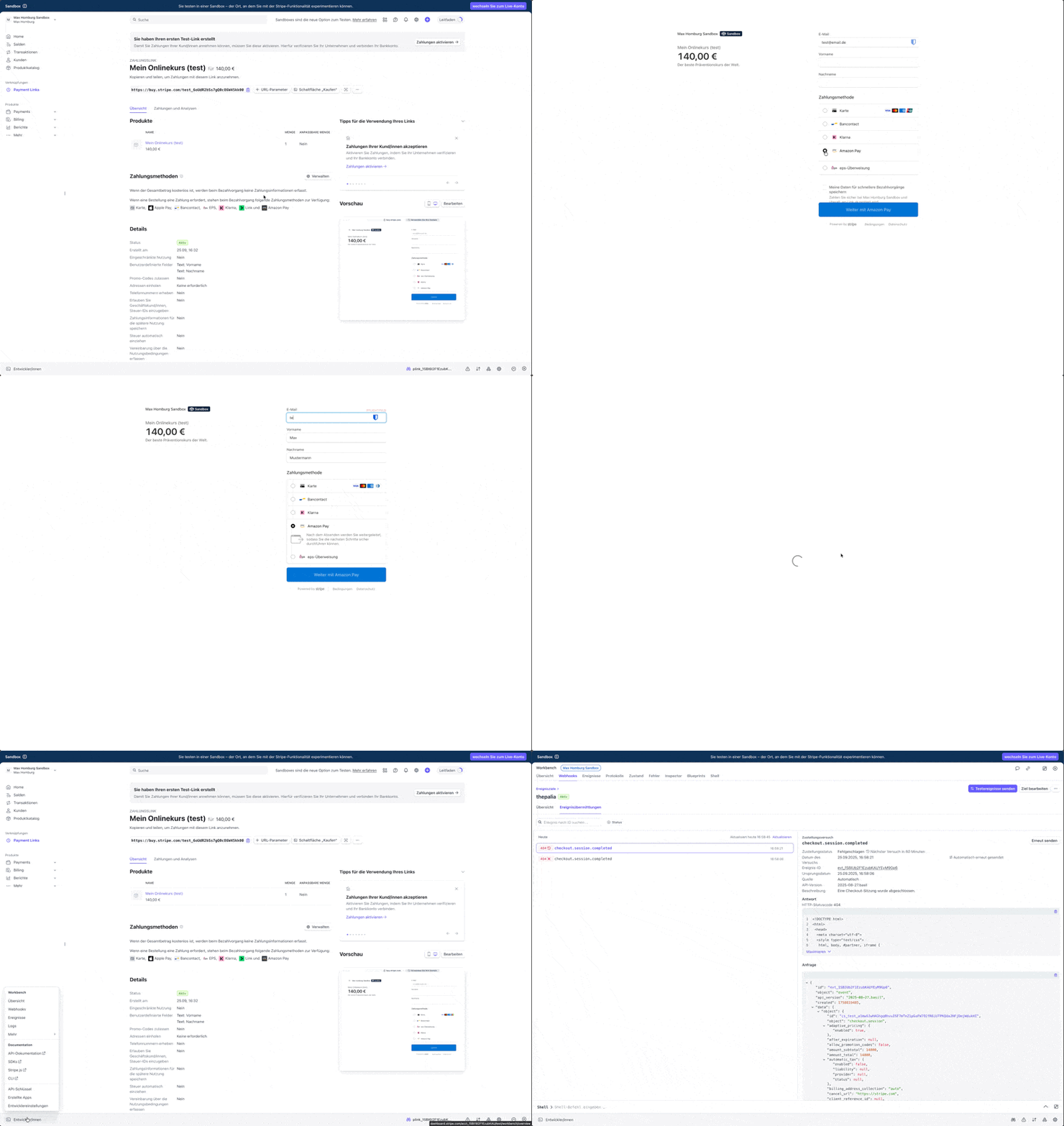
Die Aufnahme zeigt einen Sandbox-Kauf. Verwende die mit thepalia vereinbarte Test-Zahlungsart; die gezeigte Methode ist keine allgemeingültige Testanweisung.
## 6. Livebetrieb vorbereiten [#6-livebetrieb-vorbereiten]
Richte Live-Produkt, Live-Zahlungslink, Live-offer_id, Webhook-URL und Signaturgeheimnis separat ein. Vervollständige außerdem die von Stripe angeforderten Unternehmens- und Auszahlungsangaben.
Lass die Konfiguration von THEPALIA bestätigen, bevor du den Live-Zahlungslink verwendest. Ein Wechsel im Stripe-Dashboard allein stellt die gesamte Integration nicht auf Livebetrieb um. In der THEPALIA-Produktionsumgebung angelegte Kursteilnahmen werden berechnet.
Bei Storno sind Zahlungserstattung und Entfernung des Kurszugangs getrennte Schritte. Stimme den Ablauf mit THEPALIA ab.
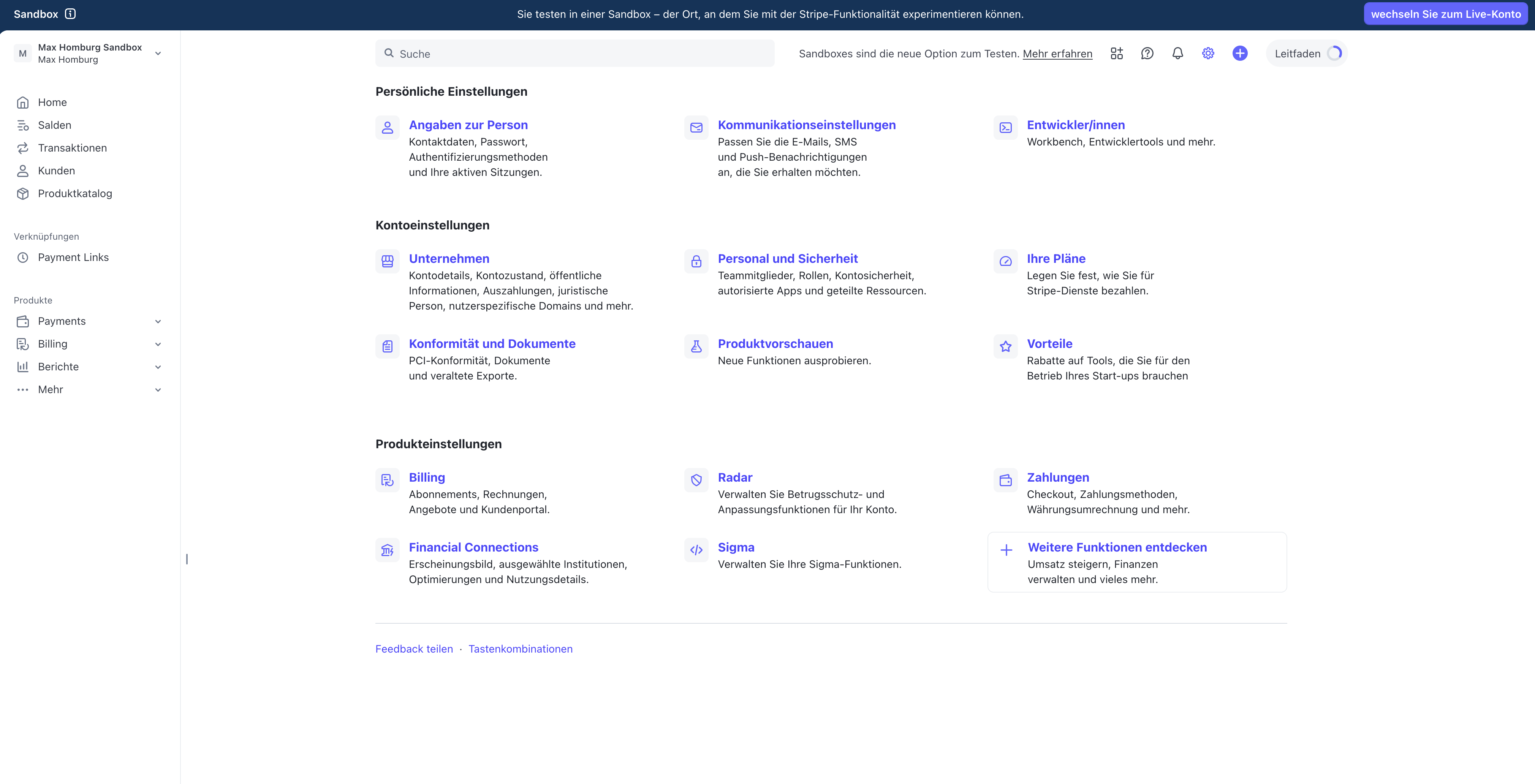
Die Stripe-Kontoumschaltung und Unternehmenseinstellungen. Die Live-Anbindung muss zusätzlich separat eingerichtet werden.
## 7. Zahlungslink auf deiner Website einbinden [#7-zahlungslink-auf-deiner-website-einbinden]
Vor dem Kauf muss die kursbezogene Bestätigung erfolgen, auch bei direkt versandten Zahlungslinks. Nutze den abgestimmten Kaufweg und den von THEPALIA bereitgestellten Kontraindikationstext.
Der folgende Code ist zum Kopieren in deine Website gedacht. Er wird hier nur angezeigt. Ersetze den Platzhalter **HIER DEN LIVE STRIPE-CHECKOUT-LINK EINTRAGEN** und **[KONTRAINDIKATIONEN HIER EINFÜGEN]**. Passe bei Bedarf die Farben in den kommentierten CSS-Zeilen an.
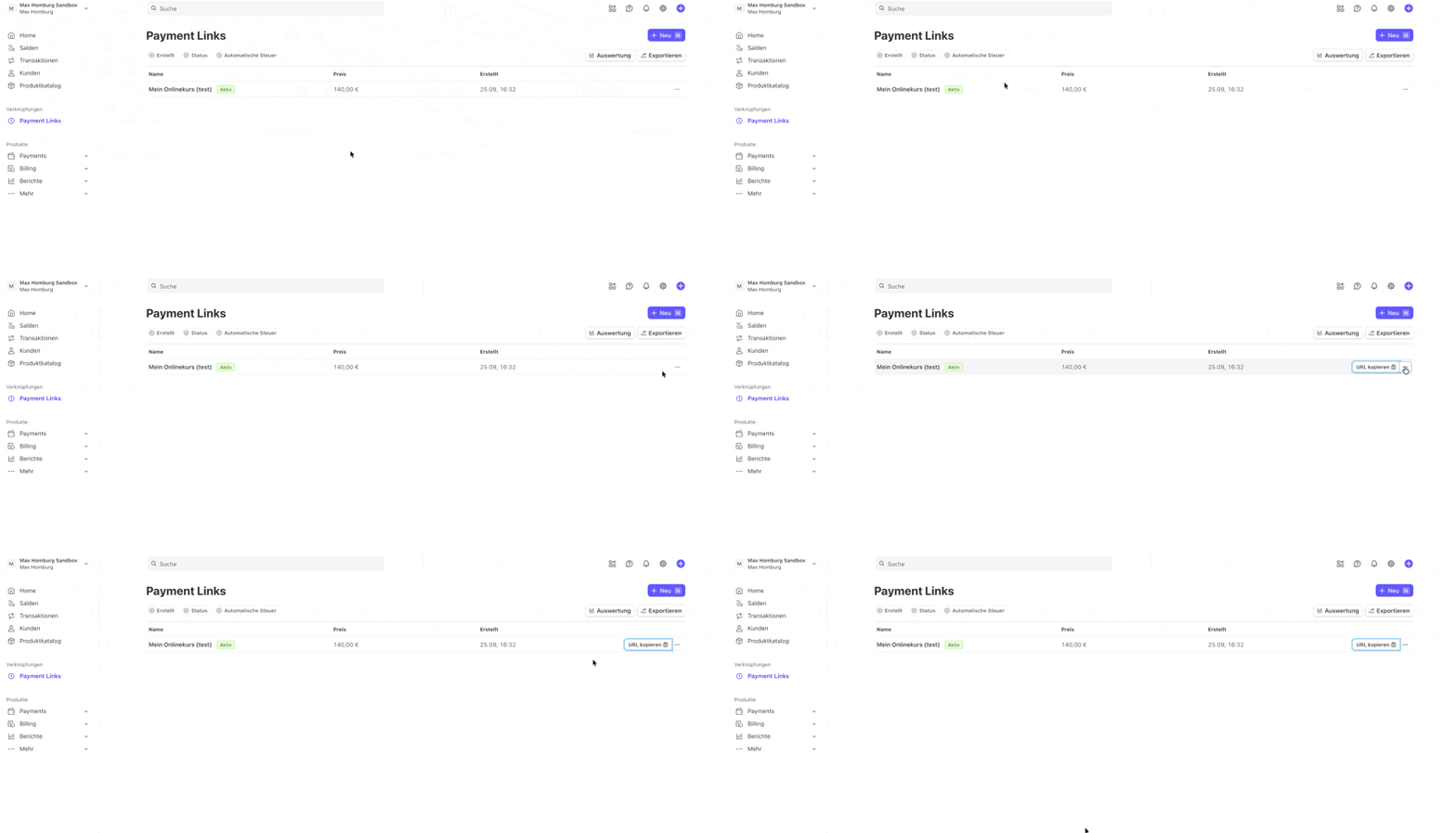
Kopiere deinen eigenen Live-Zahlungslink erst nach Bestätigung der Live-Konfiguration.
```html
```
## Ergebnis prüfen [#ergebnis-prüfen]
Der eingerichtete Zahlungslink erfasst Vorname, Nachname und E-Mail, ordnet den Kurs über offer_id zu und sendet das vereinbarte Ereignis an THEPALIA. Dein Test ist abgeschlossen, wenn die Registrierungsmail ankommt, die Registrierung gelingt und der richtige Kurs geöffnet werden kann.
# Set up Stripe payment links
Source: /guides/stripe-payment-link
Sell your course without a custom shop integration and send course access automatically.
[English guide](/guides/stripe-payment-link) · [Deutsche Anleitung](/guides/stripe-payment-link-de)
Sell your course with a Stripe payment link. After the agreed checkout event is processed, thepalia sends the participant an email to register for their course.
## Before you start [#before-you-start]
You need a **Stripe account**, a **course product and price**, the **offer_id**, the exact **thepalia webhook URL**, and your course's agreed **contraindication text**. Ask [our dev team](mailto:max@thepalia.de) for these integration details.
Agree which Stripe test environment connects to which thepalia environment, and how you will share the webhook signing secret securely. Start in that test environment; do not use a real payment as an improvised test.
> About the screenshots and GIFs
>
> These original walkthroughs show Stripe's German dashboard. Menu labels and layout may differ in your
> account. Follow the written steps and use your own environment-specific values, not the example account or
> payment links in the recordings. Expand a demo when you want to watch it.
## 1. Prepare your Stripe account and product [#1-prepare-your-stripe-account-and-product]
1. [Create a Stripe account](https://dashboard.stripe.com/register) if you do not have one, and verify your email address.
2. Open the product area in the [Stripe Dashboard](https://dashboard.stripe.com/).
3. Create a course product with the agreed **one-time price**. Add its name, description, and an image if needed.
4. Save the product in the agreed test environment.

Create your Stripe account before setting up the course product. Original German dashboard screenshot.

The product walkthrough shows a sample course. Use your agreed course name and price.
## 2. Create the payment link [#2-create-the-payment-link]
1. Open **Payment Links** and create a new link for the course product.
2. Check the product, amount, and currency.
3. Create two **new text fields** labelled **Vorname** and **Nachname**. Use those exact labels; do not just rename existing fields.
4. Make sure the buyer's email address is collected. The registration email will be sent there.
5. Save the link.
> Keep the required field labels in German
>
> Use **Vorname** for first name and **Nachname** for last name, even if your Stripe Dashboard is in English.
> The integration expects these exact labels on newly created fields.

Add both required name fields when creating your payment link.
## 3. Map the course offer [#3-map-the-course-offer]
Add the metadata key **offer_id** to the Payment Link. Its value must be the ID supplied by thepalia for this course and environment. `YOUR_OFFER_ID` is a placeholder; replace it with your own ID.

Use the offer ID supplied for your course and environment, not the sample text in the recording.
## 4. Connect the webhook [#4-connect-the-webhook]
A webhook sends the checkout event from Stripe to thepalia. After successful processing, thepalia can send the buyer their registration email.
1. Open Stripe's webhooks or event destinations area. Its menu location may vary.
2. Add the exact webhook URL supplied by thepalia. Do not construct your own URL.
3. Select only **checkout.session.completed** for this integration.
4. Save the endpoint and copy the signing secret for this environment.
5. Share it with thepalia through the agreed secure channel. Wait for confirmation that the connection is configured.
Only enable payment methods with delayed payment confirmation after agreeing this with our dev team. A completed checkout does not always mean that these payments have finally succeeded.

The recording illustrates the event destination setup. Enter the valid webhook URL supplied by thepalia and save it; the sample input is not a working endpoint.
## 5. Test the purchase and course access [#5-test-the-purchase-and-course-access]
Use [Stripe's official testing guide](https://docs.stripe.com/testing) and the test case agreed with thepalia.
1. Open the test payment link and check the course and price.
2. Enter a test name and email address, then complete the agreed test purchase.
3. Check the processed event in Stripe and its mapping to the correct **offer_id**.
4. Confirm that the registration email arrives and its link leads to the correct course.
5. Complete registration and verify actual course access.
Manually sending a webhook event does not replace this complete test. The staging environment is for testing and does not generate completion certificates.

The original recording shows a sandbox purchase and event inspection. Use the test payment method agreed with thepalia; the method shown is not a universal testing instruction.
## 6. Prepare to go live [#6-prepare-to-go-live]
Set up the **live product**, **live payment link**, **live offer_id**, **webhook URL**, and **signing secret** separately. Complete Stripe's required business and payout details too.
Ask thepalia to confirm the configuration before using the live payment link. Switching the Stripe Dashboard alone does not move the entire integration to production. Enrollments created in thepalia’s production environment are billed.

Stripe's account switch and business settings. Live integration values still need to be configured separately.
Payment refunds and removal of course access are separate cancellation steps. Agree the process with thepalia.
## 7. Embed the payment link on your website [#7-embed-the-payment-link-on-your-website]
Participants must confirm the course-specific suitability requirements **before purchase**, including when you send payment links directly. Use the agreed purchase flow and the contraindication text supplied by thepalia.
Copy the code below into your website; it is displayed here as an example. Replace **YOUR_LIVE_STRIPE_CHECKOUT_URL** and **[INSERT_COURSE_CONTRAINDICATIONS]**. Adjust the colours in the commented CSS lines if needed. The example's customer-facing text is in English; the German version of this guide includes a German snippet.

Copy your own live payment link after the live configuration has been confirmed.
```html
```
## Check the result [#check-the-result]
Your payment link collects first name, last name, and email, maps the course through **offer_id**, and sends the agreed event to thepalia. The integration test is complete when the registration email arrives, registration succeeds, and the participant can open the correct course.
# Getting started
Source: /
Connect your checkout, register participants, and give customers access to their thepalia course.
## Choose your integration [#choose-your-integration]
Start with the guide that fits your product. Each takes you from prerequisites to a working integration.
### [Your own checkout](/guides/create-enrollment)
Create enrollments after a purchase and send participants their registration link.
### [Course access in your app](/guides/magic-link)
Bring returning participants straight to their course with a magic link.
### [Stripe payment links](/guides/stripe-payment-link)
Sell a course without writing an API integration. Read the setup guide in English or German.
## A good first request [#a-good-first-request]
[Authentication](/authentication) · [Rate limits & retries](/rate-limits)
### Get your integration details [#get-your-integration-details]
Contact [our dev team](mailto:max@thepalia.de) for your **client ID**, **client secret**, **offer ID**, and the suitability requirements for your course. Use the credentials supplied by our dev team and the offer ID for your selected environment. Keep credentials on your server.
### Start in staging [#start-in-staging]
Open [Obtain an API access token](/reference/oauth/get_token_for_credentials), enter your credentials, and send the request. Copy `access_token` from the response.
### Make an authenticated request [#make-an-authenticated-request]
Open an operation in the reference and enter `Bearer ` in its **Authorization** field. The playground uses staging. Reuse your token for its **24-hour** lifetime.
Follow the [enrollment guide](/guides/create-enrollment) for the request, expected response, and registration flow.
## Choose your environment [#choose-your-environment]
| Environment | API URL | Use it for |
| ----------- | --------------------------------- | ------------------------------------------------------------------- |
| Staging | `https://api.staging.thepalia.de` | Testing your integration. No completion certificates are generated. |
| Production | `https://api.thepalia.de` | Live enrollments and course access. Enrollments are billed. |
> Playground requests are real requests
>
> The playground sends requests directly to staging and requires staging credentials. Production enrollments
> made from your own integration are billed.
> Create the enrollment after a confirmed purchase. Save the returned IDs before sending the participant their registration link.
Registration links last **31 days**. Magic links last **30 minutes**; generate them just before use. Activation codes are a **legacy integration**, used only when thepalia explicitly instructs you to.
## Keep building [#keep-building]
Check [system status](https://status.thepalia.ch/status/thepalia-app) or [contact our dev team](mailto:max@thepalia.de) when you need help. Use **Copy Markdown** on any page to bring the docs into your coding assistant, or load the [LLM index](/llms.txt) and [complete documentation](/llms-full.txt). The reviewed [OpenAPI JSON](/openapi.json) is available for tooling and client generation.
# Rate limits & retries
Source: /rate-limits
Cache access tokens, respect token issuance limits, and avoid duplicate enrollments.
## Token issuance limit [#token-issuance-limit]
**`POST /v1/oauth/token`** accepts **20 requests per minute per client IP**. Applications sharing an outbound IP share this limit. Requests above the limit return **HTTP 429**.
This is the documented limit for token issuance, not a general quota for every v1 operation. See the [token reference](/reference/oauth/get_token_for_credentials) for its response details.
> Reuse tokens for 24 hours
>
> Cache the access token and its expiry on your server. Reuse it for all protected requests until it expires
> instead of requesting a new token for every customer or API call. See [Authentication](/authentication).
## Handle a rate-limited token request [#handle-a-rate-limited-token-request]
1. Check whether your server already has a valid cached token.
2. If you need a new token, pause before retrying. Do not loop immediately on `429`.
3. Use a bounded retry policy with increasing delays and jitter, allowing the minute window to clear. Stop after a reasonable number of attempts and surface the failure.
4. Coordinate concurrent workers so only one refreshes the shared token at a time.
The token endpoint does not guarantee a `Retry-After` header. Your integration must be able to wait and back off without one.
## Retry safely [#retry-safely]
| Situation | Suggested action |
| --------------------------------------------------------- | ------------------------------------------------------------------ |
| Invalid credentials or input (`400`, `401`, `415`, `422`) | Fix the request or credentials before trying again. |
| Token issuance returns `429` | Reuse a valid token or wait and retry with backoff. |
| A read request times out | Retry with a bounded backoff policy. |
| Enrollment creation times out after sending | Reconcile the uncertain result before creating another enrollment. |
> Enrollment creation is not idempotent
>
> `POST /v1/course-enrollments` has no idempotency protection. A timeout may mean the enrollment was created
> but its response was lost. Blindly resending the request can create another billed enrollment.
Store returned IDs whenever available. If a creation result is uncertain and you cannot reconcile it from your own records, contact [our dev team](mailto:max@thepalia.de) before submitting another creation request. The API does not expose a public enrollment lookup by your order ID.
> A retry should recover from a failure without turning one purchase into two enrollments.
## Verify your integration [#verify-your-integration]
Use staging and confirm that multiple protected requests reuse the same token. You do not need to deliberately exceed the limit to test your integration: simulate a `429` in your own application tests and verify that retries stop after your configured bound.
Check [system status](https://status.thepalia.ch/status/thepalia-app) when investigating a wider outage, and follow the [enrollment guide](/guides/create-enrollment) for the complete flow.
# Create an activation code
Source: /reference/activationcodes/generate_activation_code
Legacy integration. Create an activation code and registration URL for the supplied participant and offer. Use this integration only if thepalia explicitly tells you to; normally create a course enrollment instead. The offer must belong to your partner account and match the API environment. Each request generates a new code, so do not blindly repeat an uncertain request.
```json
{
"components": {
"securitySchemes": {
"OAuth2": {
"description": "Obtain a token at /v1/oauth/token, then send Authorization: Bearer .",
"flows": {
"clientCredentials": {
"scopes": {},
"tokenUrl": "/v1/oauth/token"
}
},
"type": "oauth2"
}
},
"schemas": {
"ActivationCodeExternalCreateRequest": {
"properties": {
"eMail": {
"description": "Participant's email address. Existing users are matched by email.",
"title": "Email",
"type": "string"
},
"firstName": {
"description": "Participant's first name.",
"title": "Firstname",
"type": "string"
},
"lastName": {
"description": "Participant's last name.",
"title": "Lastname",
"type": "string"
},
"offerId": {
"description": "Offer ID supplied by thepalia for this course and API environment.",
"format": "uuid",
"title": "Offerid",
"type": "string"
}
},
"required": [
"offerId",
"firstName",
"lastName",
"eMail"
],
"title": "ActivationCodeExternalCreateRequest",
"type": "object"
},
"ActivationCodeExternalCreatedResponse": {
"properties": {
"code": {
"description": "Activation code to give to the participant for the agreed integration.",
"title": "Code",
"type": "string"
},
"registrationUrl": {
"description": "Registration URL containing the activation code.",
"title": "Registrationurl",
"type": "string"
}
},
"required": [
"code",
"registrationUrl"
],
"title": "ActivationCodeExternalCreatedResponse",
"type": "object"
},
"HTTPValidationError": {
"properties": {
"detail": {
"items": {
"$ref": "#/components/schemas/ValidationError"
},
"title": "Detail",
"type": "array"
}
},
"title": "HTTPValidationError",
"type": "object"
},
"ValidationError": {
"properties": {
"ctx": {
"title": "Context",
"type": "object"
},
"input": {
"title": "Input"
},
"loc": {
"items": {
"anyOf": [
{
"type": "string"
},
{
"type": "integer"
}
]
},
"title": "Location",
"type": "array"
},
"msg": {
"title": "Message",
"type": "string"
},
"type": {
"title": "Error Type",
"type": "string"
}
},
"required": [
"loc",
"msg",
"type"
],
"title": "ValidationError",
"type": "object"
}
}
},
"info": {
"description": "Create course enrollments and integrate course access with your checkout. Contact max@thepalia.de for credentials and offer IDs.",
"title": "thepalia Partner API",
"version": "v1"
},
"openapi": "3.2.0",
"paths": {
"/v1/activation-codes": {
"post": {
"deprecated": true,
"description": "Legacy integration. Create an activation code and registration URL for the supplied participant and offer. Use this integration only if thepalia explicitly tells you to; normally create a course enrollment instead. The offer must belong to your partner account and match the API environment. Each request generates a new code, so do not blindly repeat an uncertain request.",
"operationId": "generate_activation_code",
"requestBody": {
"content": {
"application/json": {
"example": {
"eMail": "alex@example.com",
"firstName": "Alex",
"lastName": "Example",
"offerId": "11111111-1111-4111-8111-111111111111"
},
"schema": {
"$ref": "#/components/schemas/ActivationCodeExternalCreateRequest"
}
}
},
"required": true
},
"responses": {
"200": {
"content": {
"application/json": {
"example": {
"code": "EXAMPLE-CODE",
"registrationUrl": "https://thepalia.app/courses/register?activationCode=EXAMPLE-CODE&email=alex%40example.com&firstName=Alex&lastName=Example"
},
"schema": {
"$ref": "#/components/schemas/ActivationCodeExternalCreatedResponse"
}
}
},
"description": "Activation code created."
},
"400": {
"content": {
"application/json": {
"example": {
"detail": "Could not create activation code"
},
"schema": {
"properties": {
"detail": {
"description": "Human-readable error message.",
"type": "string"
}
},
"required": [
"detail"
],
"type": "object"
}
}
},
"description": "Could not generate a unique activation code."
},
"401": {
"content": {
"application/json": {
"example": {
"detail": "Invalid token"
},
"schema": {
"properties": {
"detail": {
"description": "Human-readable error message.",
"type": "string"
}
},
"required": [
"detail"
],
"type": "object"
}
}
},
"description": "Missing, expired, invalid, or inactive API credential token."
},
"403": {
"content": {
"application/json": {
"example": {
"detail": "Access denied"
},
"schema": {
"properties": {
"detail": {
"description": "Human-readable error message.",
"type": "string"
}
},
"required": [
"detail"
],
"type": "object"
}
}
},
"description": "The enrollment or offer does not belong to your partner account."
},
"404": {
"content": {
"application/json": {
"example": {
"detail": "Not found"
},
"schema": {
"properties": {
"detail": {
"description": "Human-readable error message.",
"type": "string"
}
},
"required": [
"detail"
],
"type": "object"
}
}
},
"description": "The requested enrollment or offer was not found."
},
"422": {
"content": {
"application/json": {
"schema": {
"$ref": "#/components/schemas/HTTPValidationError"
}
}
},
"description": "Validation Error"
}
},
"security": [
{
"OAuth2": []
}
],
"summary": "Create an activation code",
"tags": [
"ActivationCodes"
]
}
}
},
"servers": [
{
"description": "Production — enrollments are billed",
"url": "https://api.thepalia.de"
},
{
"description": "Staging — testing, no completion certificates",
"url": "https://api.staging.thepalia.de"
}
]
}
```
# Create a course enrollment
Source: /reference/courseenrollments/create_course_enrollment_external
After a successful purchase and confirmation of the course's suitability requirements, create an enrollment using the offer ID supplied by thepalia. Existing participants are matched by email. Store userId and courseEnrollmentId with your order, then email registrationUrl to the participant; the registration link is valid for 31 days. Production enrollments are billable. Each request creates a separate enrollment: there is no idempotency protection. After an ambiguous timeout, reconcile with thepalia before submitting again. Prefer this integration over activation codes unless instructed otherwise.
```json
{
"components": {
"securitySchemes": {
"OAuth2": {
"description": "Obtain a token at /v1/oauth/token, then send Authorization: Bearer .",
"flows": {
"clientCredentials": {
"scopes": {},
"tokenUrl": "/v1/oauth/token"
}
},
"type": "oauth2"
}
},
"schemas": {
"CourseEnrollmentExternalCreateRequest": {
"properties": {
"eMail": {
"description": "Participant's email address. Existing users are matched by email.",
"title": "Email",
"type": "string"
},
"firstName": {
"description": "Participant's first name.",
"title": "Firstname",
"type": "string"
},
"lastName": {
"description": "Participant's last name.",
"title": "Lastname",
"type": "string"
},
"offerId": {
"description": "Offer ID supplied by thepalia for this course and API environment.",
"format": "uuid",
"title": "Offerid",
"type": "string"
}
},
"required": [
"offerId",
"firstName",
"lastName",
"eMail"
],
"title": "CourseEnrollmentExternalCreateRequest",
"type": "object"
},
"CourseEnrollmentExternalCreatedResponse": {
"properties": {
"courseEnrollmentId": {
"description": "Enrollment ID used for magic links, progress, and cancellation.",
"format": "uuid",
"title": "Courseenrollmentid",
"type": "string"
},
"registrationUrl": {
"description": "Registration link to send to the participant. Valid for 31 days.",
"title": "Registrationurl",
"type": "string"
},
"userId": {
"description": "Participant ID. Store with your customer or order for support.",
"format": "uuid",
"title": "Userid",
"type": "string"
}
},
"required": [
"userId",
"courseEnrollmentId",
"registrationUrl"
],
"title": "CourseEnrollmentExternalCreatedResponse",
"type": "object"
},
"HTTPValidationError": {
"properties": {
"detail": {
"items": {
"$ref": "#/components/schemas/ValidationError"
},
"title": "Detail",
"type": "array"
}
},
"title": "HTTPValidationError",
"type": "object"
},
"ValidationError": {
"properties": {
"ctx": {
"title": "Context",
"type": "object"
},
"input": {
"title": "Input"
},
"loc": {
"items": {
"anyOf": [
{
"type": "string"
},
{
"type": "integer"
}
]
},
"title": "Location",
"type": "array"
},
"msg": {
"title": "Message",
"type": "string"
},
"type": {
"title": "Error Type",
"type": "string"
}
},
"required": [
"loc",
"msg",
"type"
],
"title": "ValidationError",
"type": "object"
}
}
},
"info": {
"description": "Create course enrollments and integrate course access with your checkout. Contact max@thepalia.de for credentials and offer IDs.",
"title": "thepalia Partner API",
"version": "v1"
},
"openapi": "3.2.0",
"paths": {
"/v1/course-enrollments": {
"post": {
"description": "After a successful purchase and confirmation of the course's suitability requirements, create an enrollment using the offer ID supplied by thepalia. Existing participants are matched by email. Store userId and courseEnrollmentId with your order, then email registrationUrl to the participant; the registration link is valid for 31 days. Production enrollments are billable. Each request creates a separate enrollment: there is no idempotency protection. After an ambiguous timeout, reconcile with thepalia before submitting again. Prefer this integration over activation codes unless instructed otherwise.",
"operationId": "create_course_enrollment_external",
"requestBody": {
"content": {
"application/json": {
"example": {
"eMail": "alex@example.com",
"firstName": "Alex",
"lastName": "Example",
"offerId": "11111111-1111-4111-8111-111111111111"
},
"schema": {
"$ref": "#/components/schemas/CourseEnrollmentExternalCreateRequest"
}
}
},
"required": true
},
"responses": {
"200": {
"content": {
"application/json": {
"example": {
"courseEnrollmentId": "33333333-3333-4333-8333-333333333333",
"registrationUrl": "https://thepalia.app/enrollment/registration?enrollmentId=33333333-3333-4333-8333-333333333333",
"userId": "22222222-2222-4222-8222-222222222222"
},
"schema": {
"$ref": "#/components/schemas/CourseEnrollmentExternalCreatedResponse"
}
}
},
"description": "Enrollment created. Send the registration link to the participant."
},
"401": {
"content": {
"application/json": {
"example": {
"detail": "Invalid token"
},
"schema": {
"properties": {
"detail": {
"description": "Human-readable error message.",
"type": "string"
}
},
"required": [
"detail"
],
"type": "object"
}
}
},
"description": "Missing, expired, invalid, or inactive API credential token."
},
"403": {
"content": {
"application/json": {
"example": {
"detail": "Access denied"
},
"schema": {
"properties": {
"detail": {
"description": "Human-readable error message.",
"type": "string"
}
},
"required": [
"detail"
],
"type": "object"
}
}
},
"description": "The enrollment or offer does not belong to your partner account."
},
"404": {
"content": {
"application/json": {
"example": {
"detail": "Not found"
},
"schema": {
"properties": {
"detail": {
"description": "Human-readable error message.",
"type": "string"
}
},
"required": [
"detail"
],
"type": "object"
}
}
},
"description": "The requested enrollment or offer was not found."
},
"422": {
"content": {
"application/json": {
"schema": {
"$ref": "#/components/schemas/HTTPValidationError"
}
}
},
"description": "Validation Error"
}
},
"security": [
{
"OAuth2": []
}
],
"summary": "Create a course enrollment",
"tags": [
"CourseEnrollments"
]
}
}
},
"servers": [
{
"description": "Production — enrollments are billed",
"url": "https://api.thepalia.de"
},
{
"description": "Staging — testing, no completion certificates",
"url": "https://api.staging.thepalia.de"
}
]
}
```
# Cancel a course enrollment
Source: /reference/courseenrollments/delete_course_enrollment_external_by_enrollment_id
Delete an enrollment belonging to your partner account using its courseEnrollmentId. This removes the enrollment and course access; it does not refund a payment in your checkout system. A successful response is HTTP 204 with no body. A missing or already deleted enrollment returns 404.
```json
{
"components": {
"securitySchemes": {
"OAuth2": {
"description": "Obtain a token at /v1/oauth/token, then send Authorization: Bearer .",
"flows": {
"clientCredentials": {
"scopes": {},
"tokenUrl": "/v1/oauth/token"
}
},
"type": "oauth2"
}
},
"schemas": {
"HTTPValidationError": {
"properties": {
"detail": {
"items": {
"$ref": "#/components/schemas/ValidationError"
},
"title": "Detail",
"type": "array"
}
},
"title": "HTTPValidationError",
"type": "object"
},
"ValidationError": {
"properties": {
"ctx": {
"title": "Context",
"type": "object"
},
"input": {
"title": "Input"
},
"loc": {
"items": {
"anyOf": [
{
"type": "string"
},
{
"type": "integer"
}
]
},
"title": "Location",
"type": "array"
},
"msg": {
"title": "Message",
"type": "string"
},
"type": {
"title": "Error Type",
"type": "string"
}
},
"required": [
"loc",
"msg",
"type"
],
"title": "ValidationError",
"type": "object"
}
}
},
"info": {
"description": "Create course enrollments and integrate course access with your checkout. Contact max@thepalia.de for credentials and offer IDs.",
"title": "thepalia Partner API",
"version": "v1"
},
"openapi": "3.2.0",
"paths": {
"/v1/course-enrollments/{enrollment_id}": {
"delete": {
"description": "Delete an enrollment belonging to your partner account using its courseEnrollmentId. This removes the enrollment and course access; it does not refund a payment in your checkout system. A successful response is HTTP 204 with no body. A missing or already deleted enrollment returns 404.",
"operationId": "delete_course_enrollment_external_by_enrollment_id",
"parameters": [
{
"description": "courseEnrollmentId returned when the enrollment was created.",
"in": "path",
"name": "enrollment_id",
"required": true,
"schema": {
"description": "courseEnrollmentId returned when the enrollment was created.",
"format": "uuid",
"title": "Enrollment Id",
"type": "string"
}
}
],
"responses": {
"204": {
"description": "Enrollment deleted. No response body."
},
"401": {
"content": {
"application/json": {
"example": {
"detail": "Invalid token"
},
"schema": {
"properties": {
"detail": {
"description": "Human-readable error message.",
"type": "string"
}
},
"required": [
"detail"
],
"type": "object"
}
}
},
"description": "Missing, expired, invalid, or inactive API credential token."
},
"403": {
"content": {
"application/json": {
"example": {
"detail": "Access denied"
},
"schema": {
"properties": {
"detail": {
"description": "Human-readable error message.",
"type": "string"
}
},
"required": [
"detail"
],
"type": "object"
}
}
},
"description": "The enrollment or offer does not belong to your partner account."
},
"404": {
"content": {
"application/json": {
"example": {
"detail": "Not found"
},
"schema": {
"properties": {
"detail": {
"description": "Human-readable error message.",
"type": "string"
}
},
"required": [
"detail"
],
"type": "object"
}
}
},
"description": "The requested enrollment or offer was not found."
},
"422": {
"content": {
"application/json": {
"schema": {
"$ref": "#/components/schemas/HTTPValidationError"
}
}
},
"description": "Validation Error"
}
},
"security": [
{
"OAuth2": []
}
],
"summary": "Cancel a course enrollment",
"tags": [
"CourseEnrollments"
]
}
}
},
"servers": [
{
"description": "Production — enrollments are billed",
"url": "https://api.thepalia.de"
},
{
"description": "Staging — testing, no completion certificates",
"url": "https://api.staging.thepalia.de"
}
]
}
```
# Generate a course login link
Source: /reference/courseenrollments/get_course_enrollment_magic_link_by_enrollment_id
Generate a magic link for an existing enrollment belonging to your partner account. Create it on your server immediately before redirecting the participant; it expires after 30 minutes. Use courseEnrollmentId from enrollment creation. The participant must be an active customer. Do not publish or log the returned link: it authenticates the participant.
```json
{
"components": {
"securitySchemes": {
"OAuth2": {
"description": "Obtain a token at /v1/oauth/token, then send Authorization: Bearer .",
"flows": {
"clientCredentials": {
"scopes": {},
"tokenUrl": "/v1/oauth/token"
}
},
"type": "oauth2"
}
},
"schemas": {
"CourseEnrollmentMagicLinkResponse": {
"properties": {
"magicLink": {
"description": "Login link valid for 30 minutes. Generate immediately before redirecting.",
"title": "Magiclink",
"type": "string"
}
},
"required": [
"magicLink"
],
"title": "CourseEnrollmentMagicLinkResponse",
"type": "object"
},
"HTTPValidationError": {
"properties": {
"detail": {
"items": {
"$ref": "#/components/schemas/ValidationError"
},
"title": "Detail",
"type": "array"
}
},
"title": "HTTPValidationError",
"type": "object"
},
"ValidationError": {
"properties": {
"ctx": {
"title": "Context",
"type": "object"
},
"input": {
"title": "Input"
},
"loc": {
"items": {
"anyOf": [
{
"type": "string"
},
{
"type": "integer"
}
]
},
"title": "Location",
"type": "array"
},
"msg": {
"title": "Message",
"type": "string"
},
"type": {
"title": "Error Type",
"type": "string"
}
},
"required": [
"loc",
"msg",
"type"
],
"title": "ValidationError",
"type": "object"
}
}
},
"info": {
"description": "Create course enrollments and integrate course access with your checkout. Contact max@thepalia.de for credentials and offer IDs.",
"title": "thepalia Partner API",
"version": "v1"
},
"openapi": "3.2.0",
"paths": {
"/v1/course-enrollments/{enrollment_id}/magic-link": {
"get": {
"description": "Generate a magic link for an existing enrollment belonging to your partner account. Create it on your server immediately before redirecting the participant; it expires after 30 minutes. Use courseEnrollmentId from enrollment creation. The participant must be an active customer. Do not publish or log the returned link: it authenticates the participant.",
"operationId": "get_course_enrollment_magic_link_by_enrollment_id",
"parameters": [
{
"description": "courseEnrollmentId returned when the enrollment was created.",
"in": "path",
"name": "enrollment_id",
"required": true,
"schema": {
"description": "courseEnrollmentId returned when the enrollment was created.",
"format": "uuid",
"title": "Enrollment Id",
"type": "string"
}
}
],
"responses": {
"200": {
"content": {
"application/json": {
"example": {
"magicLink": "https://thepalia.app/user/magic-link/EXAMPLE_TOKEN?ref=%2Fcourses%2F33333333-3333-4333-8333-333333333333"
},
"schema": {
"$ref": "#/components/schemas/CourseEnrollmentMagicLinkResponse"
}
}
},
"description": "Temporary login link created."
},
"401": {
"content": {
"application/json": {
"example": {
"detail": "Invalid token"
},
"schema": {
"properties": {
"detail": {
"description": "Human-readable error message.",
"type": "string"
}
},
"required": [
"detail"
],
"type": "object"
}
}
},
"description": "Missing, expired, invalid, or inactive API credential token."
},
"403": {
"content": {
"application/json": {
"example": {
"detail": "Access denied"
},
"schema": {
"properties": {
"detail": {
"description": "Human-readable error message.",
"type": "string"
}
},
"required": [
"detail"
],
"type": "object"
}
}
},
"description": "The enrollment or offer does not belong to your partner account."
},
"404": {
"content": {
"application/json": {
"example": {
"detail": "Not found"
},
"schema": {
"properties": {
"detail": {
"description": "Human-readable error message.",
"type": "string"
}
},
"required": [
"detail"
],
"type": "object"
}
}
},
"description": "The requested enrollment or offer was not found."
},
"422": {
"content": {
"application/json": {
"schema": {
"$ref": "#/components/schemas/HTTPValidationError"
}
}
},
"description": "Validation Error"
}
},
"security": [
{
"OAuth2": []
}
],
"summary": "Generate a course login link",
"tags": [
"CourseEnrollments"
]
}
}
},
"servers": [
{
"description": "Production — enrollments are billed",
"url": "https://api.thepalia.de"
},
{
"description": "Staging — testing, no completion certificates",
"url": "https://api.staging.thepalia.de"
}
]
}
```
# Read enrollment progress
Source: /reference/courseenrollments/get_course_enrollment_progress_by_enrollment_id
Read progress for an enrollment belonging to your partner account using its courseEnrollmentId. Counts and durations refer to sections and units in the current course. Dates describe the access period and completion state; completionDate and lastSectionCompletedAt may be null. This request does not change the enrollment.
```json
{
"components": {
"securitySchemes": {
"OAuth2": {
"description": "Obtain a token at /v1/oauth/token, then send Authorization: Bearer .",
"flows": {
"clientCredentials": {
"scopes": {},
"tokenUrl": "/v1/oauth/token"
}
},
"type": "oauth2"
}
},
"schemas": {
"CourseEnrollmentProgressResponse": {
"properties": {
"accessibleFrom": {
"description": "Start of the participant's course access period.",
"format": "date-time",
"title": "Accessiblefrom",
"type": "string"
},
"accessibleUntil": {
"description": "End of the participant's course access period.",
"format": "date-time",
"title": "Accessibleuntil",
"type": "string"
},
"completedDurationInSeconds": {
"description": "Sum of durations of completed sections, in seconds.",
"title": "Completeddurationinseconds",
"type": "integer"
},
"completedSectionsCount": {
"description": "Number of completed sections in the current course.",
"title": "Completedsectionscount",
"type": "integer"
},
"completedUnitsCount": {
"description": "Number of fully completed course units.",
"title": "Completedunitscount",
"type": "integer"
},
"completionDate": {
"anyOf": [
{
"format": "date-time",
"type": "string"
},
{
"type": "null"
}
],
"description": "Course completion time, or null if the course is incomplete.",
"title": "Completiondate"
},
"courseEnrollmentId": {
"description": "ID of the requested enrollment.",
"format": "uuid",
"title": "Courseenrollmentid",
"type": "string"
},
"lastSectionCompletedAt": {
"anyOf": [
{
"format": "date-time",
"type": "string"
},
{
"type": "null"
}
],
"description": "Most recent section completion time, or null if none.",
"title": "Lastsectioncompletedat"
},
"totalDurationInSeconds": {
"description": "Sum of all section durations, in seconds.",
"title": "Totaldurationinseconds",
"type": "integer"
},
"totalSectionsCount": {
"description": "Total number of sections in the current course.",
"title": "Totalsectionscount",
"type": "integer"
},
"totalUnitsCount": {
"description": "Total number of course units.",
"title": "Totalunitscount",
"type": "integer"
},
"userId": {
"description": "ID of the participant enrolled in the course.",
"format": "uuid",
"title": "Userid",
"type": "string"
}
},
"required": [
"courseEnrollmentId",
"userId",
"completedSectionsCount",
"totalSectionsCount",
"completedUnitsCount",
"totalUnitsCount",
"completedDurationInSeconds",
"totalDurationInSeconds",
"accessibleFrom",
"accessibleUntil",
"lastSectionCompletedAt",
"completionDate"
],
"title": "CourseEnrollmentProgressResponse",
"type": "object"
},
"HTTPValidationError": {
"properties": {
"detail": {
"items": {
"$ref": "#/components/schemas/ValidationError"
},
"title": "Detail",
"type": "array"
}
},
"title": "HTTPValidationError",
"type": "object"
},
"ValidationError": {
"properties": {
"ctx": {
"title": "Context",
"type": "object"
},
"input": {
"title": "Input"
},
"loc": {
"items": {
"anyOf": [
{
"type": "string"
},
{
"type": "integer"
}
]
},
"title": "Location",
"type": "array"
},
"msg": {
"title": "Message",
"type": "string"
},
"type": {
"title": "Error Type",
"type": "string"
}
},
"required": [
"loc",
"msg",
"type"
],
"title": "ValidationError",
"type": "object"
}
}
},
"info": {
"description": "Create course enrollments and integrate course access with your checkout. Contact max@thepalia.de for credentials and offer IDs.",
"title": "thepalia Partner API",
"version": "v1"
},
"openapi": "3.2.0",
"paths": {
"/v1/course-enrollments/{enrollment_id}/progress": {
"get": {
"description": "Read progress for an enrollment belonging to your partner account using its courseEnrollmentId. Counts and durations refer to sections and units in the current course. Dates describe the access period and completion state; completionDate and lastSectionCompletedAt may be null. This request does not change the enrollment.",
"operationId": "get_course_enrollment_progress_by_enrollment_id",
"parameters": [
{
"description": "courseEnrollmentId returned when the enrollment was created.",
"in": "path",
"name": "enrollment_id",
"required": true,
"schema": {
"description": "courseEnrollmentId returned when the enrollment was created.",
"format": "uuid",
"title": "Enrollment Id",
"type": "string"
}
}
],
"responses": {
"200": {
"content": {
"application/json": {
"example": {
"accessibleFrom": "2026-01-01T00:00:00",
"accessibleUntil": "2027-01-01T00:00:00",
"completedDurationInSeconds": 900,
"completedSectionsCount": 3,
"completedUnitsCount": 1,
"courseEnrollmentId": "33333333-3333-4333-8333-333333333333",
"lastSectionCompletedAt": "2026-01-02T10:00:00",
"totalDurationInSeconds": 3600,
"totalSectionsCount": 12,
"totalUnitsCount": 4,
"userId": "22222222-2222-4222-8222-222222222222"
},
"schema": {
"$ref": "#/components/schemas/CourseEnrollmentProgressResponse"
}
}
},
"description": "Current progress and access period."
},
"401": {
"content": {
"application/json": {
"example": {
"detail": "Invalid token"
},
"schema": {
"properties": {
"detail": {
"description": "Human-readable error message.",
"type": "string"
}
},
"required": [
"detail"
],
"type": "object"
}
}
},
"description": "Missing, expired, invalid, or inactive API credential token."
},
"403": {
"content": {
"application/json": {
"example": {
"detail": "Access denied"
},
"schema": {
"properties": {
"detail": {
"description": "Human-readable error message.",
"type": "string"
}
},
"required": [
"detail"
],
"type": "object"
}
}
},
"description": "The enrollment or offer does not belong to your partner account."
},
"404": {
"content": {
"application/json": {
"example": {
"detail": "Not found"
},
"schema": {
"properties": {
"detail": {
"description": "Human-readable error message.",
"type": "string"
}
},
"required": [
"detail"
],
"type": "object"
}
}
},
"description": "The requested enrollment or offer was not found."
},
"422": {
"content": {
"application/json": {
"schema": {
"$ref": "#/components/schemas/HTTPValidationError"
}
}
},
"description": "Validation Error"
}
},
"security": [
{
"OAuth2": []
}
],
"summary": "Read enrollment progress",
"tags": [
"CourseEnrollments"
]
}
}
},
"servers": [
{
"description": "Production — enrollments are billed",
"url": "https://api.thepalia.de"
},
{
"description": "Staging — testing, no completion certificates",
"url": "https://api.staging.thepalia.de"
}
]
}
```
# List health-insurance coverages
Source: /reference/info/get_health_insurance_coverages
List the configured health insurers and their course reimbursement information. This endpoint is public and does not require an access token. Entries contain a coverage percentage, a maximum reimbursement amount in euros, and a link to the insurer's information. Use the insurer's current terms to confirm eligibility.
```json
{
"components": {
"securitySchemes": {
"OAuth2": {
"description": "Obtain a token at /v1/oauth/token, then send Authorization: Bearer .",
"flows": {
"clientCredentials": {
"scopes": {},
"tokenUrl": "/v1/oauth/token"
}
},
"type": "oauth2"
}
},
"schemas": {
"HealthInsuranceCoveragePublic": {
"properties": {
"coveragePercent": {
"description": "Percentage of the course price covered by the insurer.",
"maximum": 100,
"minimum": 0,
"title": "Coveragepercent",
"type": "integer"
},
"id": {
"description": "ID of the health-insurance coverage entry.",
"format": "uuid",
"title": "Id",
"type": "string"
},
"insuranceName": {
"description": "Name of the health insurer.",
"title": "Insurancename",
"type": "string"
},
"link": {
"description": "Link to the insurer's information about reimbursement.",
"title": "Link",
"type": "string"
},
"maxCoverageAmount": {
"description": "Maximum reimbursement amount in euros.",
"minimum": 0,
"title": "Maxcoverageamount",
"type": "integer"
}
},
"required": [
"id",
"insuranceName",
"coveragePercent",
"link",
"maxCoverageAmount"
],
"title": "HealthInsuranceCoveragePublic",
"type": "object"
}
}
},
"info": {
"description": "Create course enrollments and integrate course access with your checkout. Contact max@thepalia.de for credentials and offer IDs.",
"title": "thepalia Partner API",
"version": "v1"
},
"openapi": "3.2.0",
"paths": {
"/v1/info/health-insurance-coverages": {
"get": {
"description": "List the configured health insurers and their course reimbursement information. This endpoint is public and does not require an access token. Entries contain a coverage percentage, a maximum reimbursement amount in euros, and a link to the insurer's information. Use the insurer's current terms to confirm eligibility.",
"operationId": "get_health_insurance_coverages",
"responses": {
"200": {
"content": {
"application/json": {
"example": [
{
"coveragePercent": 80,
"id": "44444444-4444-4444-8444-444444444444",
"insuranceName": "Example insurance",
"link": "https://example.com/reimbursement",
"maxCoverageAmount": 100
}
],
"schema": {
"items": {
"$ref": "#/components/schemas/HealthInsuranceCoveragePublic"
},
"title": "Response Get Health Insurance Coverages",
"type": "array"
}
}
},
"description": "Configured health-insurance coverages."
}
},
"summary": "List health-insurance coverages",
"tags": [
"Info"
]
}
}
},
"servers": [
{
"description": "Production — enrollments are billed",
"url": "https://api.thepalia.de"
},
{
"description": "Staging — testing, no completion certificates",
"url": "https://api.staging.thepalia.de"
}
]
}
```
# Obtain an API access token
Source: /reference/oauth/get_token_for_credentials
Exchange the client_id and client_secret supplied by thepalia for a Bearer token valid for 24 hours. Reuse it in the Authorization header until expiry. Credential issuance is limited to 20 requests per minute per client IP. JSON, URL-encoded form, multipart form, and HTTP Basic credentials are accepted. With HTTP Basic, send Authorization: Basic base64(client_id:client_secret); no body is needed. Keep credentials in your server, never in participant-facing browser code.
```json
{
"components": {
"securitySchemes": {
"OAuth2": {
"description": "Obtain a token at /v1/oauth/token, then send Authorization: Bearer .",
"flows": {
"clientCredentials": {
"scopes": {},
"tokenUrl": "/v1/oauth/token"
}
},
"type": "oauth2"
}
},
"schemas": {
"Body_get_token_for_credentials": {
"properties": {
"client_id": {
"anyOf": [
{
"type": "string"
},
{
"type": "null"
}
],
"description": "Client ID supplied by thepalia.",
"title": "Client Id"
},
"client_secret": {
"anyOf": [
{
"type": "string"
},
{
"type": "null"
}
],
"description": "Client secret supplied by thepalia. Keep it on your server.",
"title": "Client Secret"
}
},
"title": "Body_get_token_for_credentials",
"type": "object"
},
"HTTPValidationError": {
"properties": {
"detail": {
"items": {
"$ref": "#/components/schemas/ValidationError"
},
"title": "Detail",
"type": "array"
}
},
"title": "HTTPValidationError",
"type": "object"
},
"OAuthTokenResponse": {
"properties": {
"access_token": {
"description": "Bearer access token, valid for 24 hours. Reuse until expiry.",
"title": "Access Token",
"type": "string"
},
"token_type": {
"description": "Authorization scheme. The API returns Bearer.",
"title": "Token Type",
"type": "string"
}
},
"required": [
"access_token",
"token_type"
],
"title": "OAuthTokenResponse",
"type": "object"
},
"ValidationError": {
"properties": {
"ctx": {
"title": "Context",
"type": "object"
},
"input": {
"title": "Input"
},
"loc": {
"items": {
"anyOf": [
{
"type": "string"
},
{
"type": "integer"
}
]
},
"title": "Location",
"type": "array"
},
"msg": {
"title": "Message",
"type": "string"
},
"type": {
"title": "Error Type",
"type": "string"
}
},
"required": [
"loc",
"msg",
"type"
],
"title": "ValidationError",
"type": "object"
}
}
},
"info": {
"description": "Create course enrollments and integrate course access with your checkout. Contact max@thepalia.de for credentials and offer IDs.",
"title": "thepalia Partner API",
"version": "v1"
},
"openapi": "3.2.0",
"paths": {
"/v1/oauth/token": {
"post": {
"description": "Exchange the client_id and client_secret supplied by thepalia for a Bearer token valid for 24 hours. Reuse it in the Authorization header until expiry. Credential issuance is limited to 20 requests per minute per client IP. JSON, URL-encoded form, multipart form, and HTTP Basic credentials are accepted. With HTTP Basic, send Authorization: Basic base64(client_id:client_secret); no body is needed. Keep credentials in your server, never in participant-facing browser code.",
"operationId": "get_token_for_credentials",
"requestBody": {
"content": {
"application/json": {
"example": {
"client_id": "YOUR_CLIENT_ID",
"client_secret": "YOUR_CLIENT_SECRET"
},
"schema": {
"properties": {
"client_id": {
"description": "Client ID supplied by thepalia.",
"title": "Client Id",
"type": "string"
},
"client_secret": {
"description": "Client secret supplied by thepalia. Keep it on your server.",
"title": "Client Secret",
"type": "string"
}
},
"required": [
"client_id",
"client_secret"
],
"title": "OAuthCredentials",
"type": "object"
}
},
"application/x-www-form-urlencoded": {
"example": {
"client_id": "YOUR_CLIENT_ID",
"client_secret": "YOUR_CLIENT_SECRET"
},
"schema": {
"$ref": "#/components/schemas/Body_get_token_for_credentials",
"properties": {
"client_id": {
"description": "Client ID supplied by thepalia.",
"title": "Client Id",
"type": "string"
},
"client_secret": {
"description": "Client secret supplied by thepalia. Keep it on your server.",
"title": "Client Secret",
"type": "string"
}
},
"required": [
"client_id",
"client_secret"
],
"title": "OAuthCredentials",
"type": "object"
}
},
"multipart/form-data": {
"example": {
"client_id": "YOUR_CLIENT_ID",
"client_secret": "YOUR_CLIENT_SECRET"
},
"schema": {
"properties": {
"client_id": {
"description": "Client ID supplied by thepalia.",
"title": "Client Id",
"type": "string"
},
"client_secret": {
"description": "Client secret supplied by thepalia. Keep it on your server.",
"title": "Client Secret",
"type": "string"
}
},
"required": [
"client_id",
"client_secret"
],
"title": "OAuthCredentials",
"type": "object"
}
}
},
"description": "Send credentials in a body, or omit the body and use HTTP Basic authentication.",
"required": false
},
"responses": {
"200": {
"content": {
"application/json": {
"example": {
"access_token": "EXAMPLE_ACCESS_TOKEN",
"token_type": "Bearer"
},
"schema": {
"$ref": "#/components/schemas/OAuthTokenResponse"
}
}
},
"description": "Access token issued."
},
"400": {
"content": {
"application/json": {
"example": {
"detail": "Invalid JSON body"
},
"schema": {
"properties": {
"detail": {
"description": "Human-readable error message.",
"type": "string"
}
},
"required": [
"detail"
],
"type": "object"
}
}
},
"description": "Malformed credentials, invalid JSON, or missing form fields."
},
"401": {
"content": {
"application/json": {
"example": {
"detail": "invalid credentials"
},
"schema": {
"properties": {
"detail": {
"description": "Human-readable error message.",
"type": "string"
}
},
"required": [
"detail"
],
"type": "object"
}
}
},
"description": "Incorrect or inactive client credentials."
},
"404": {
"description": "Not found"
},
"415": {
"content": {
"application/json": {
"example": {
"detail": "Use application/json or application/x-www-form-urlencoded or basic auth header"
},
"schema": {
"properties": {
"detail": {
"description": "Human-readable error message.",
"type": "string"
}
},
"required": [
"detail"
],
"type": "object"
}
}
},
"description": "Unsupported request content type."
},
"422": {
"content": {
"application/json": {
"schema": {
"$ref": "#/components/schemas/HTTPValidationError"
}
}
},
"description": "Validation Error"
},
"429": {
"content": {
"application/json": {
"example": {
"error": "Rate limit exceeded: 20 per 1 minute"
},
"schema": {
"properties": {
"error": {
"description": "Human-readable error message.",
"type": "string"
}
},
"required": [
"error"
],
"type": "object"
}
}
},
"description": "Token issuance exceeded 20 requests per minute. Retry with delay."
}
},
"summary": "Obtain an API access token",
"tags": [
"OAuth"
]
}
}
},
"servers": [
{
"description": "Production — enrollments are billed",
"url": "https://api.thepalia.de"
},
{
"description": "Staging — testing, no completion certificates",
"url": "https://api.staging.thepalia.de"
}
]
}
```